

The Signet panel builds a whole signet ring from a few choices, each shown as a picture. You pick a starting profile, then the face, the shank, the border and what is cut into the face. One button builds the ring, checks it against the book and weighs it. You get it in two forms: one part for a prototype print, and head and shank apart for production.
Where to find it
CAD/CAM tab > Rings section > Signet panel, under the Rings panel. Menu: Jeweller > Ring. The eight starting profiles are under Jeweller > Ring > Signet: Start From. There is no key.
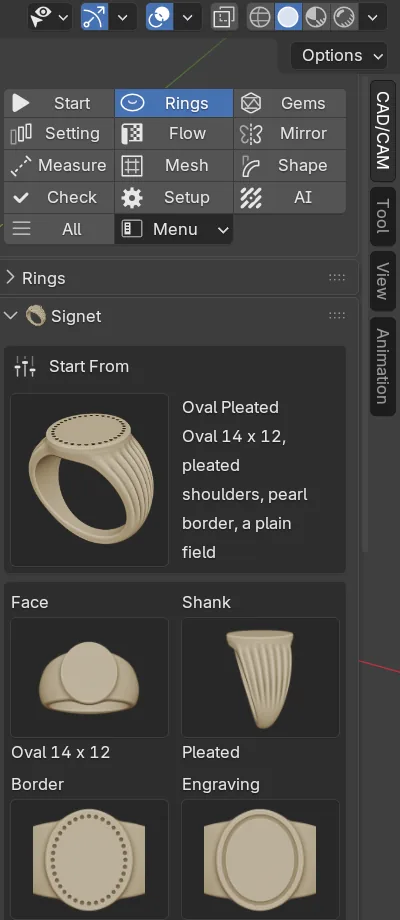
The panel runs top to bottom in the order of the work: Start From, four pictures (Face, Shank, Border and Engraving), What Is Cut, Size and Metal, Build Signet and the result card. Four closed sub-panels hold the figures: Sizes, Depths, Advanced and Sheet.
Use it
This walk-through builds a signet with two initials.
Step 1. Start from a profile
Wherethe Signet panel, the Start From box.
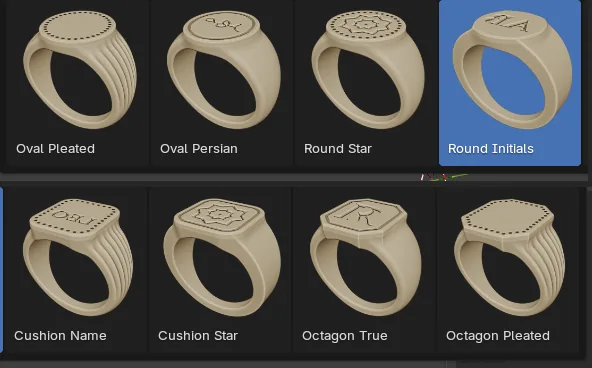
Doclick the picture, then click Round Initials in the grid.
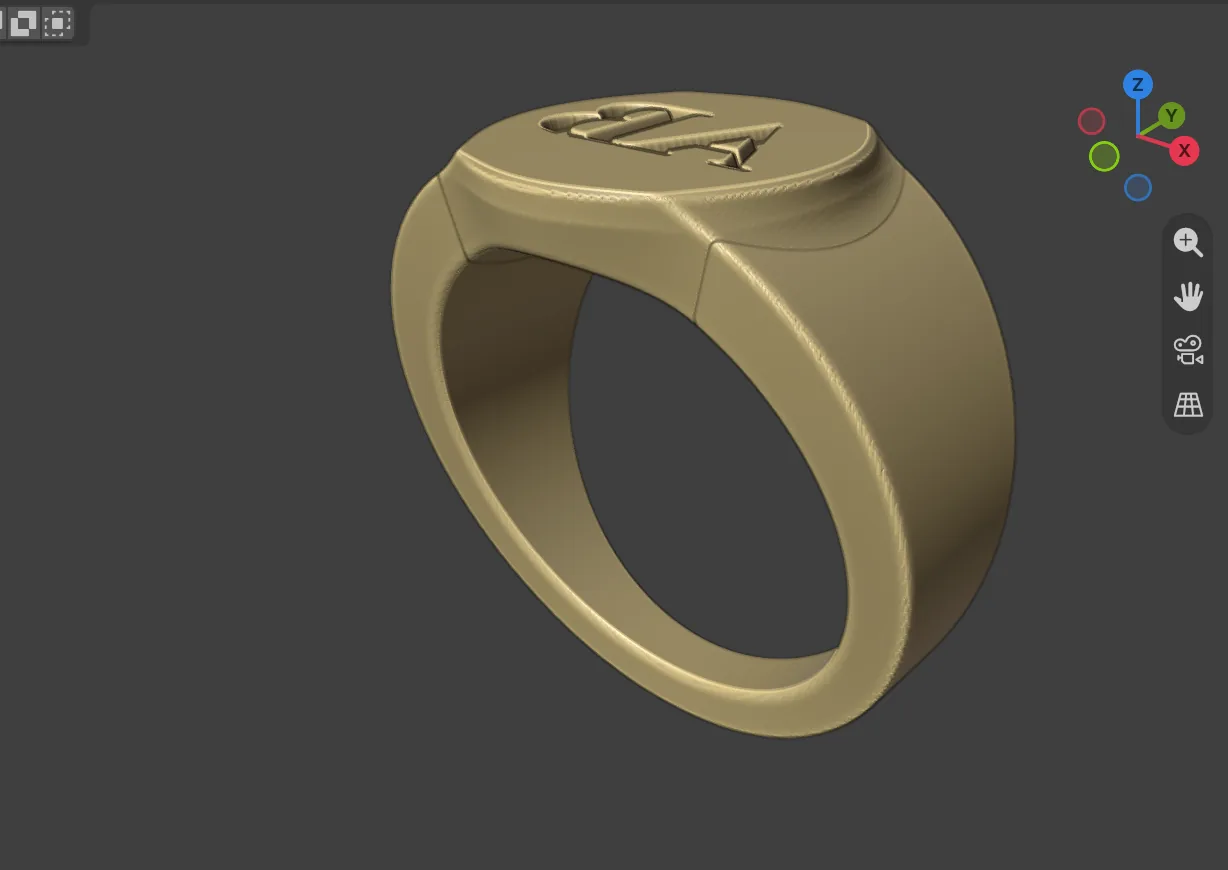
You should seea round face of 12 mm, flat sides, no border and two initials in Roman capitals. Every choice below changes to match. Your size, metal and name stay.
Step 2. Type your letters
Wherethe What Is Cut box.
Doclick the text box and replace the letters with your own two.
Typeyour own initials. The profile’s example is AB.
You should seethe Engraving caption reads “Text:” followed by your letters. The profile has already chosen the font, Cinzel, and a Stroke of 0.04 mm (in Depths). Leave both.
Step 3. Choose how it is cut
Wherethe What Is Cut box, under the text.
Doclick Seal or Reads True.
You should seea sentence under the buttons. Seal says “The impression reads true.”: it cuts in reverse, so a stamp in wax reads the right way round. Reads True says “The metal itself reads true.”
Step 4. Set the size and the metal
Wherethe Size and Metal box.
Dopick the UK letter, tick Half if you need the half size, and pick the Alloy.
You should seethe bore in millimetres from the book’s table (p.240).
Step 5. Build a preview
Wherethe build box, Build Signet.
Doleave Quality on Preview and click Build Signet.
You should seethe ring in a few seconds. The head and the shank are in the CJ Metal collection, called signet Head and signet Shank with the default name. The one-part form is hidden in the collection “One part (prototype print)”. The result card appears.
If it goes wrongEsc stops a build and keeps nothing.
Step 6. Read the card
Wherethe result card under the build box.
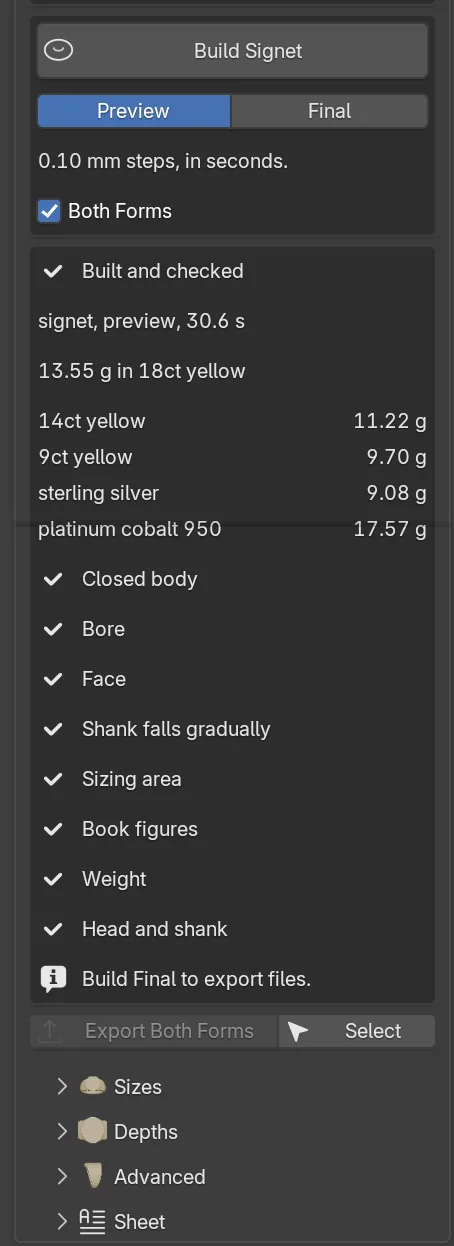
Doread the status line, the weights and each check. Change what the card complains about and build again.
You should seeone of four status lines: “Built and checked”, “Built, the book warns”, “Built, a check failed” or “Nothing was built”, which lists every reason at once. Each check has a tick or a warning triangle.
If it goes wrongif part of the text is too narrow to cut deep, open Depths and raise Stroke.
Step 7. Build final and export
Wherethe build box and the result card.
Doclick Final, click Build Signet, then click Export Both Forms and choose a folder.
You should seethe build takes about a minute. The folder holds one_part_prototype/<name>_one_part_mm.stl, two_parts_production/<name>_head_mm.stl, two_parts_production/<name>_shank_mm.stl and a notes file.
If it goes wrongthe export button stays greyed after a preview, with the note “Build Final to export files”. No file is written unless every body passes the print check.
Settings
| Setting | Default | What it changes |
|---|---|---|
| Start From | Oval Pleated | Eight profiles: Oval Pleated, Oval Persian, Round Star, Round Initials, Cushion Name, Cushion Star, Octagon True and Octagon Pleated. |
| Face, Shank, Border, Engraving | Oval, Pleated, Pearls, None | Face: Oval, Round, Cushion or Octagon. Shank: Pleated, Classic or Flat. Border: Pearls, Line or None. Engraving: a plain field, Text, Picture, Relief or Star. |
| Text | empty | The letters to cut, up to 24 characters, in any script. |
| Font | Auto | Auto, Noto Sans Arabic, Inter, Cinzel, Cormorant Garamond, Great Vibes or Font File. |
| Seal / Reads True | Seal | How the engraving is cut. |
| UK, Half | M | The ring size. The bore comes from the book’s table (p.240). |
| Alloy | 18ct yellow | The metal the weight is read in. |
| Quality | Preview | Preview builds in 0.10 mm steps. Final builds in 0.05 mm steps, for print files. |
| Both Forms | On | Also makes the head and the shank as their own parts. |
The closed sub-panels hold the figures, all in millimetres unless stated.
| Setting | Default | What it changes |
|---|---|---|
| Sizes: Length, Width | 14.00 mm, 12.00 mm | The face along the finger (7.00 to 22.00 mm) and across it (6.00 to 20.00 mm). A round face has one Diameter. |
| Sizes: Base Width, Base Depth | 2.20 mm, 1.80 mm | The shank at 6 o’clock. 1.50 to 6.00 mm wide, 1.20 to 3.00 mm deep. |
| Sizes: Join Width | 10.6 mm | Where the shoulders meet the head. Auto scales it with the face. 4.00 to 16.00 mm. |
| Depths: Pearls | 36 | The count. Size 0.64 mm, Inset 1.00 mm. |
| Depths: Cut line | 0.60 mm wide | Depth 0.35 mm, Inset 1.00 mm. |
| Depths: Engraving | 0.45 mm deep | 0.30 to 0.80 mm. Stroke thickens or thins every stroke, -0.10 to 0.20 mm. |
| Advanced | Rim 0.90 mm, Chamfer 0.20 mm, Taper 14.0 degrees, Plate Over Bore 2.30 mm, Field Gap 0.35 mm. |
Good to know
- A warning is not a failure: the ring is built and the card says what the book would say. After a failed check, do not use the files until it is mended.
- A new build with the same name replaces the last. Change Name in Sheet to keep both.
- Persian and Arabic: the add-on joins the letters, and a “Joined:” line under the text box shows the word as it will be cut. Use a font that holds the joined forms. Nastaliq cannot be shaped here, so cut a picture of the calligraphy instead.
- Picture takes a .png: dark is cut, light is not. Relief takes an .npz height map and cuts deeper where it is higher. Star cuts the eight-point star.
- Sheet: Save Sheet writes every choice as a small file. Load Sheet checks the whole file first and lists every problem. Blank Sheet clears the panel and keeps the size, metal, Both Forms and quality.
- Select selects the last build’s head, shank and one-part ring.
- The inside of the shank is not engraved here: that is a laser job after casting. Nothing is ready to cast, and a caster checks every file.