

AI Studio takes a description, or your own picture, to a 3D model that comes into your scene at its true size without leaving Blender. Tripo, an online service for 3D models, builds the model from a clean reference picture. A generated model is a shape to copy, never a castable file. You rebuild what matters with the add-on’s own tools, then run the checks.
Where to find it
CAD/CAM tab > AI section > AI Studio panel. Six numbered panels sit below it, 1 Connect to 6 Place, then Your Own Claude or ChatGPT. Menu: Jeweller > AI Studio. There are no keys. A line at the head, “Next:”, always says what to do next. Nothing is sent until you press a button, and it needs Blender’s online access. Keys, costs and privacy covers that.
Use it
Step 1. Connect Tripo
Wherethe 1 Connect panel.
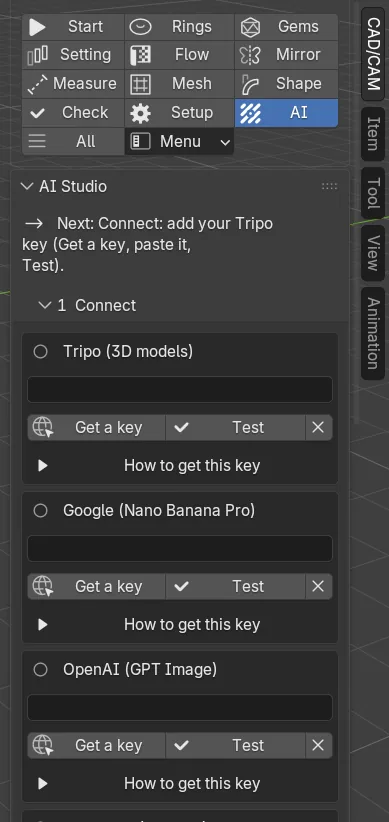
Doin the Tripo (3D models) box, click Get a key, make a key on Tripo’s page, paste it into the box and click Test.
You should seea tick beside the name and the credits you have. Every model needs a Tripo key. A Google or OpenAI key is needed only if AI Studio is to make the picture. See Keys, costs and privacy.
Step 2. Describe the piece
Wherethe 2 Describe panel.
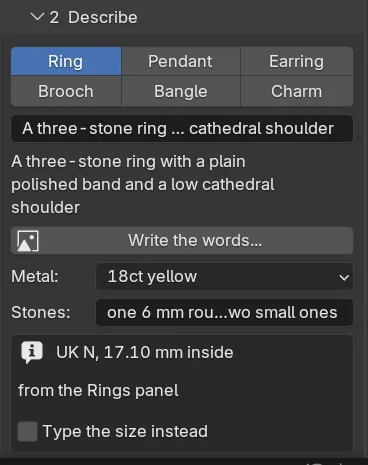
Doclick a piece: Ring, Pendant, Earring, Brooch, Bangle or Charm. Type the words, or click Write the words… for a roomy window. Add Metal and Stones if you want them said.
You should seea size box. A ring reads its size from the Rings panel and shows it as “mm inside”, unless you tick Type the size instead. The other pieces start at 25 mm for a pendant, 15 mm for an earring, 40 mm for a brooch, 60 mm inside for a bangle and 12 mm for a charm. Those are largest sides, apart from the bangle. Choose One picture or Four views.
Step 3. Add pictures to go by (optional)
Wherethe 2 Describe panel, Pictures to go by.
Doclick Add… and pick your photographs or sketches, or click 3D View for a picture of the view as it is now, or open From a Reference Image.
You should seea thumbnail for each, with a list for the view it shows (Front, Left, Back, Right or Other) and a cross to remove it. Your pictures lead and the words only add what they do not show.
If it goes wronga picture must be a PNG, JPEG or WEBP file on your own computer, at most 20 MB. It is checked before anything is sent. A refused file gets a plain sentence and nothing leaves Blender.
Step 4. Refine the brief
Wherethe 3 Refine panel.
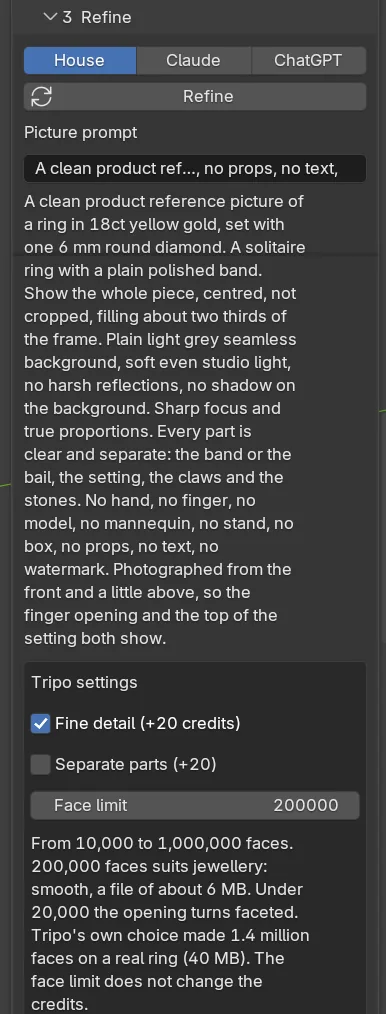
Doleave House, which is free and gives the same answer every time, or pick Claude or ChatGPT to have a model write the brief with your own key. Click Refine.
You should seea Picture prompt in a box. Edit it freely: what is in the box is what is sent. Under Tripo settings: Fine detail (+20 credits) ticked, Separate parts (+20) unticked and a Face limit. A short list of cautions follows.
Step 5. Make the picture
Wherethe 4 Picture panel.
Dochoose Nano Banana Pro or GPT Image, then click Make a picture. For four views the button reads Make four pictures. With photographs of your own, tick I have my own pictures and go to Step 6.
You should seea thumbnail for each picture. Click the one to model from. For four views the front is made first and the other three follow it.
Step 6. Make the 3D model
Wherethe 5 Model panel.
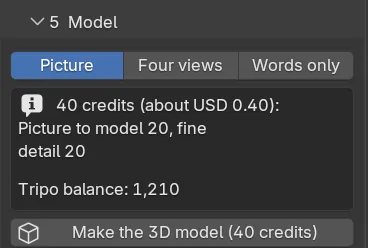
Dochoose Picture, Four views or Words only, read the cost above the button, then click Make the 3D model.
You should seethe cost, for example “40 credits (about USD 0.40): picture to model 20, fine detail 20”. 100 credits is about USD 1. You also see your balance once you have pressed Test, and a progress bar. A model takes from about half a minute to a few minutes.
If it goes wrongthe X by the bar stops the waiting, not Tripo’s task. If you cancel, or close Blender, Fetch the model brings the model in later at no extra cost.
Step 7. Place it at true size
Wherethe 6 Place panel.
Doclick Place at true size.
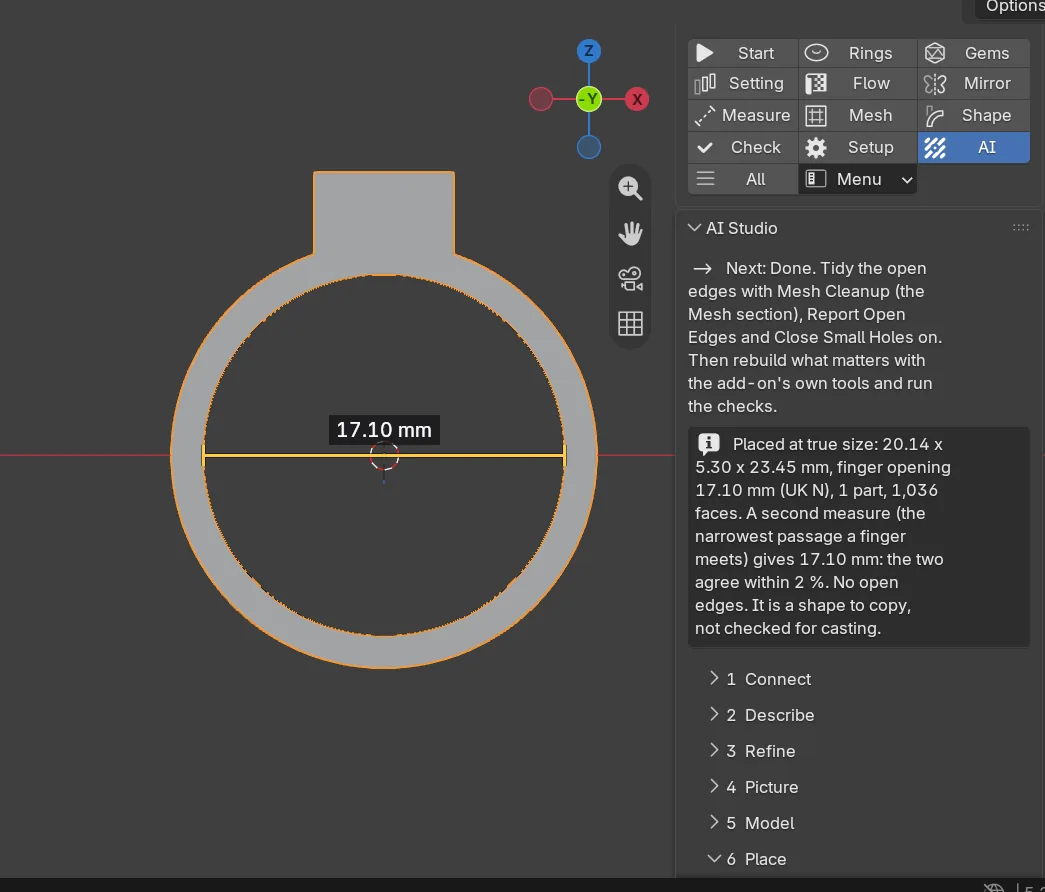
You should seethe model on the 3D cursor, in millimetres. The working copy is in a collection called <name> Tripo, each part its own object. The model exactly as Tripo sent it is hidden in <name> Tripo raw. A sentence says what was measured, such as “Placed at true size: 21.40 x 19.80 x 8.20 mm, finger opening 17.10 mm, 1 part”.
If it goes wronga refusal names its cause and the remedy. See “How true size works” below.
Step 8. Tidy it and rebuild what matters
WhereCAD/CAM tab > Mesh section.
Dorun Mesh Cleanup… with Report Open Edges and Close Small Holes on. Then rebuild the claws, seats, stones and shank with the add-on’s own tools, and run the checks.
You should seethe open edges counted, then closed where they are small. A fresh model nearly always has some. See Mesh.
How true size works
- A ring or a bangle is stood on its axis with the axis on Y and the head towards +Z. It is scaled so the finger opening equals the inside diameter of the size you chose, and the middle of the opening sits on the 3D cursor.
- A second measure follows: the narrowest passage a finger meets. The sentence gives both figures and says whether they agree within 2 %. If they differ more, it says so. Check the opening with the Ruler.
- A ring up to 15 % off round is placed, with a note. Beyond that it is refused. So is a solid ball or disc, a cup with a floor, or anything with a film across the opening.
- Any other piece is scaled so its largest side equals your size, and left upright as it came.
- The scale is baked into the points, so no object carries a scale.
Settings
| Setting | Default | What it changes |
|---|---|---|
| Piece | Ring | How the model is scaled. |
| Metal | Not stated | Says the metal in the words and shows the placed model in it. |
| Views | One picture | Four views makes front, left, back and right. |
| Refine With | House | Claude or ChatGPT write the brief with your own key. |
| Fine detail | On | Sharper claws and edges. Costs 20 more credits. |
| Separate parts | Off | The model in separate parts. Costs 20 more credits. |
| Face limit | 200,000 | The most faces Tripo may use, 10,000 to 1,000,000. It does not change the credits. |
| Model From | Picture | Four views or Words only instead. |
| Picture model | Nano Banana Pro | Size starts at 1K, or choose 2K. For GPT Image, Model is Sunburst (best) or Flare (quick), and Quality starts at Medium. |
| Close small holes | On | Closes holes up to 1.5 mm across when placing. The finger opening is never closed. |
| Keep the raw model hidden | On | Keeps the model as Tripo sent it. |
Good to know
- Parts from Separate parts often come back as open patches. Use them to see how the piece divides, then rebuild the metal.
- Stones come back as lumps of metal. Delete the lump and put the add-on’s own stone in its place.
- Anything thinner than about 0.4 mm is lost or fused. Ask for heavier claws and a sturdier shank. Fine engraving, lettering and open lacework rarely survive: add them in CAD afterwards.
- A face limit under 20,000 turns a ring’s opening faceted. A higher limit is a heavier file. 200,000 gives a file of about 6 MB.
- AI Studio never calls a model castable, and neither should you.