

CAD/CAM Jeweller is free software. You may use it, study it, change it and share it, for your own work and for commercial work. This page says what that means, who made the add-on and which open-source parts and fonts are built into it.
The licence
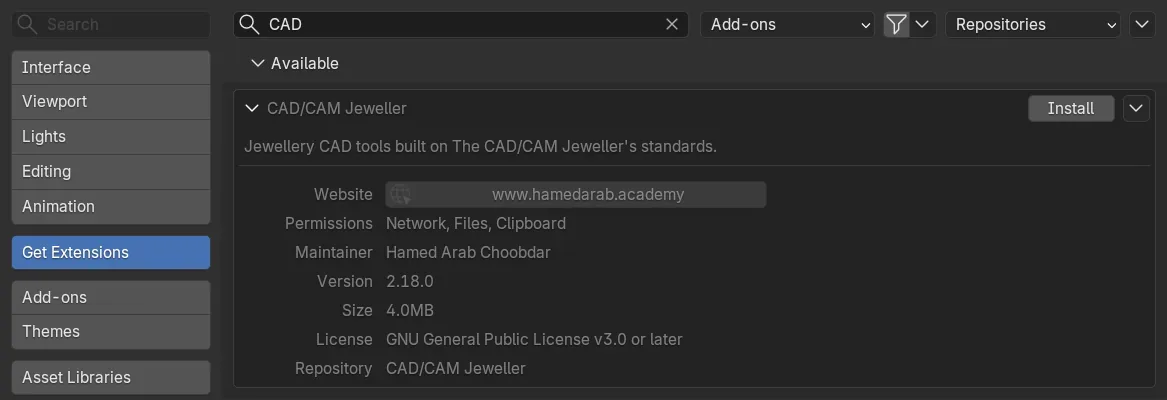
The add-on is licensed under GPL-3.0-or-later: the GNU General Public License, version 3 or, at your option, any later version. Blender’s own listing of the add-on writes it as GNU General Public License v3.0 or later.
- You may use it for any purpose, including commercially.
- You may study it and change it.
- You may share it. If you share a changed version, it stays under the same licence.
- It comes with no warranty.
Your designs are yours. The licence covers the add-on itself. The rings, stones and settings you make with it belong to you.
Nothing the tools make is ready to cast. A caster checks every file.
Who made it
CAD/CAM Jeweller is made and maintained by Hamed Arab Choobdar, copyright 2025 to 2026, at hamedarab.academy. Its defaults come from The CAD/CAM Jeweller, Volume 1 wherever the book speaks. The Setup panel’s The book’s course button opens the book’s page.
What is built in
Three things inside the add-on were made by others and are used under their own open-source licences. The copyright lines below are the ones in the add-on’s manifest.
| Part | Where you meet it | Made by | Licence |
|---|---|---|---|
| Retopology tools | The Retopology menu and tools | Orange Turbine, 2023 to 2025 | GPL-3.0-or-later |
| Loop Tools | The Loop Tools panel and menu | Bart Crouch, 2024. Vladimir Spivak (cwolf3d), 2024. Blender Foundation, 2011 to 2023 | GPL-2.0-or-later |
| Three signet fonts | The Signet panel | See below | SIL Open Font License, Version 1.1 |
Both tool sets are built in. If you also have a separate copy switched on, see If something goes wrong.
The signet fonts
The Signet panel can cut text in three fonts that travel with the add-on.
| Font | Copyright |
|---|---|
| Cinzel Bold | 2020 The Cinzel Project Authors |
| Cormorant Garamond Bold | 2015 the Cormorant Project Authors |
| Great Vibes Regular | 2015 The Great Vibes Pro Project Authors |
Each is licensed under the SIL Open Font License, Version 1.1. It lets you use, study, modify and redistribute the fonts freely, as long as they are not sold by themselves. The full text is in the add-on’s own folder, in data/signet_fonts/OFL.txt.
Persian and Arabic letters are drawn with the fonts that come with Blender, and you can choose a font file of your own in the Signet panel.
What Blender shows about it
Blender lists the permissions an extension asks for. This one asks for three, and gives a reason for each.
| Permission | The reason the add-on gives |
|---|---|
| network | Send pictures and words to AI services you connect |
| files | Read reference pictures and save generated models |
| clipboard | Copy the AI guide to paste into your AI app |
AI Studio is optional. With Allow Online Access off in Blender, it sends nothing.
AI services
AI Studio talks to services you connect with your own keys. Each service has its own terms. Check them for what you may do with its output. AI Studio explains the keys.