

The Rings panel builds the band of a ring at the size of the finger. You pick a size, add a rail to judge the band against, build the band in one of six profiles and, if you want, set stones all the way round it. Reach for it first on any ring.
Where to find it
CAD/CAM tab > Rings section > Rings panel. Menu: Jeweller > Ring. There is no key.
Use it
Step 1. Choose the finger size
Wherethe Rings panel, the box at the top.
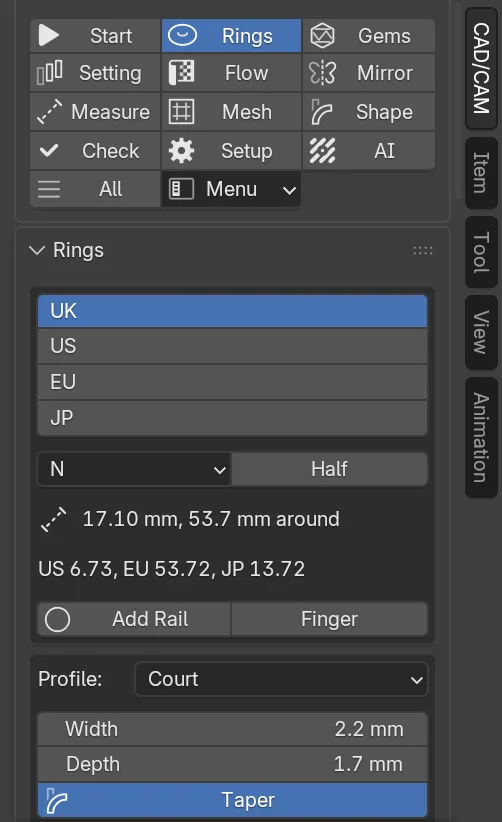
Doclick UK, US, EU or JP, then set the size. For UK, pick the letter from the drop-down and tick Half for the half size above it.
You should seetwo lines under the size. The first gives the inner diameter in millimetres and the length round the finger. The second gives the same finger in the other three systems.
If it goes wronga warning line reading “No diameter for that size” means the size is not in the table. Pick another.
Step 2. Add the rail
Wherethe Rings panel, the size box, Add Rail beside the Finger tick.
Doclick Add Rail. Leave Finger ticked to get the finger too.
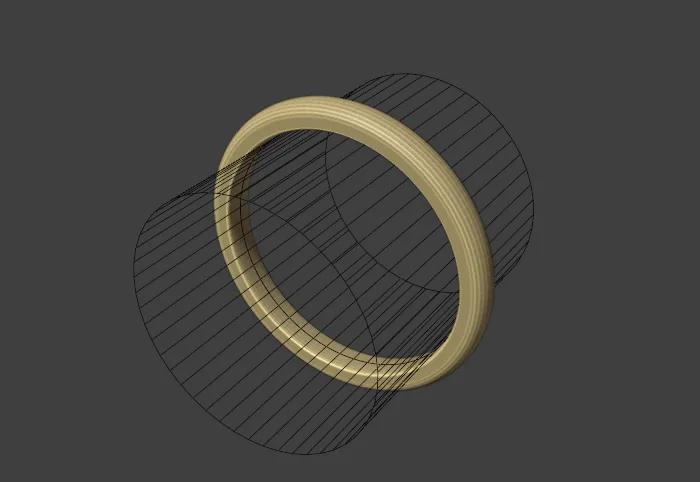
You should seea wire circle at the finger’s own size, lying in the ring plane, and a wire finger 20 mm long through it. Both are wire, so they never render.
Step 3. Set the section of the band
Wherethe Rings panel, the second box.
Dopick a Profile. Set Width and Depth in millimetres. Click Book Section to take the book’s figures instead.
You should seeafter Book Section, Width 2.2 mm and Depth 1.8 mm, the book’s sizing area at 6 o’clock. Taper is ticked, with Top Width 2 mm and Top Depth 1.2 mm, the bridge at 12 o’clock.
If it goes wronga warning line with a triangle in the box means a figure is under the book’s minimum. The band still builds. The line is a warning, not a block.
Step 4. Build the band
Wherethe Rings panel, the row of two buttons under the section box.
Doclick Build Shank.
You should seea new object named for its profile and size, such as CJ_Shank_DShape_M, in the CJ Metal collection. The status bar gives its name and the size.
Step 5. Resize it
Wherethe Rings panel, Resize, beside Build Shank.
Doclick the band, change the size in the top box, then click Resize.
You should seethe band rebuilt at the new size with the same section. Its stones and settings move out or in with the metal. The status bar gives the old and new inner diameter and how many attached objects moved.
If it goes wronga greyed Resize means the active object is not a band built here. Click the band first.
Step 6. Measure a ring
Wherethe Rings panel, Measure Active.
Domake the ring the active object and click Measure Active.
You should seethe inner diameter and the size in UK, US, EU and JP, in the status bar and under the buttons. It casts rays across the bore, so it works on a band from elsewhere too.
Step 7. Set stones all the way round
Wherethe Rings panel, the Eternity box at the foot.
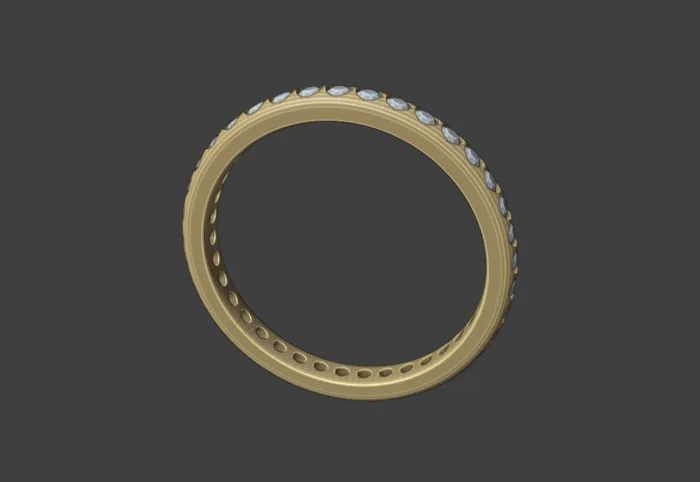
Domake the band the active object. Set Stone, Gap, Seat and Fraction Round Band. Leave Cutters and Cut ticked. Click Make Eternity.
You should seea row of stones round the band, each in its cut seat. The status bar says how many stones were set.
If it goes wrong“No room for a stone at that width and gap” means the stone and the gap do not fit the band. Make the stone smaller.
Settings
The size fields. Each system keeps its own value, so switching from UK to US does not lose your letter.
| Setting | Default | What it changes |
|---|---|---|
| System | UK | Which size table the size reads: UK, US, EU or JP. |
| UK | M | The UK letter. Half adds the half size above it. |
| US | 6.25 | The US size, in quarters. 1.00 to 15.00. |
| EU | 52 mm | The inner circumference in millimetres. 40 to 76. |
| JP | 12 | The Japanese size. 1 to 30. |
| Finger | On | Adds a wire finger through the rail. |
The section of the band.
| Setting | Default | What it changes |
|---|---|---|
| Profile | D Shape | D Shape is flat inside and domed outside, the classic wedding band. Court is curved inside and out. Flat is square with softened corners. Flat Court is flat outside and curved inside. Knife Edge rises to a central ridge. Bevelled is flat with the outer corners chamfered. |
| Width | 2.20 mm | The band’s width at 6 o’clock. 0.50 to 30.00 mm. |
| Depth | 1.80 mm | The metal’s depth at 6 o’clock. 0.30 to 10.00 mm. |
| Taper | Off | Blends to a different section at 12 o’clock. |
| Top Width | 2.00 mm | The width at 12 o’clock. Used when Taper is on. 0.50 to 30.00 mm. |
| Top Depth | 1.20 mm | The metal’s depth at 12 o’clock, the bridge. Used when Taper is on. 0.30 to 10.00 mm. |
| Comfort, 0 to 1 | 0.50 | How far the inner corners are rounded off. |
| Alloy | 18ct yellow | The metal, for colour and weight: 18ct yellow, 18ct rose, 18ct white, 9ct yellow, sterling silver or platinum. |
The Eternity box.
| Setting | Default | What it changes |
|---|---|---|
| Stone | 1.50 mm | The width of each stone. 0.30 to 12.00 mm. |
| Gap | 0.15 mm | The metal left between neighbouring stones. 0.00 to 3.00 mm. |
| Seat | 0.30 mm | How far the girdle sits under the outer surface. 0.00 to 3.00 mm. |
| Fraction Round Band | 1.00 | How far round the band the stones run: 1.00 is the full circle, 0.50 a half, centred on 12 o’clock. 0.05 to 1.00. |
| Stone Type | Diamond | Which of the 14 stones to set. |
| Cutters | On | Builds a seat cutter under every stone. |
| Cut | On | Cuts the seats out of the band at once. |
| Claws | Off | Sets each stone in claws, 0.60 mm above the table. |
Good to know
- The book’s sizing area is 2.20 x 1.80 mm at 6 o’clock, and its bridge is 1.20 mm at 12 o’clock (p.165). In 18ct gold and silver the book allows 1.00 mm as an absolute minimum.
- A band built here has its centre at the origin. The finger runs along the Y axis, 12 o’clock is straight up and 6 o’clock straight down. Other tools rely on this.
- The count of eternity stones comes from the seating radius and the pitch, which is the stone plus the gap.
- Resize does not re-space stones. Their angles stay as they were. Run Make Eternity again if you want them re-spaced.
- The rail and the finger sit in CJ Metal as wire. Select only the metal before you export.