

AI Studio uses your own accounts, pay as you go. You make a key at each service, paste it into Blender and pay the service directly. This page says which keys you need, what each step costs as the add-on states it, where the keys live and what leaves your computer.
Where to find it
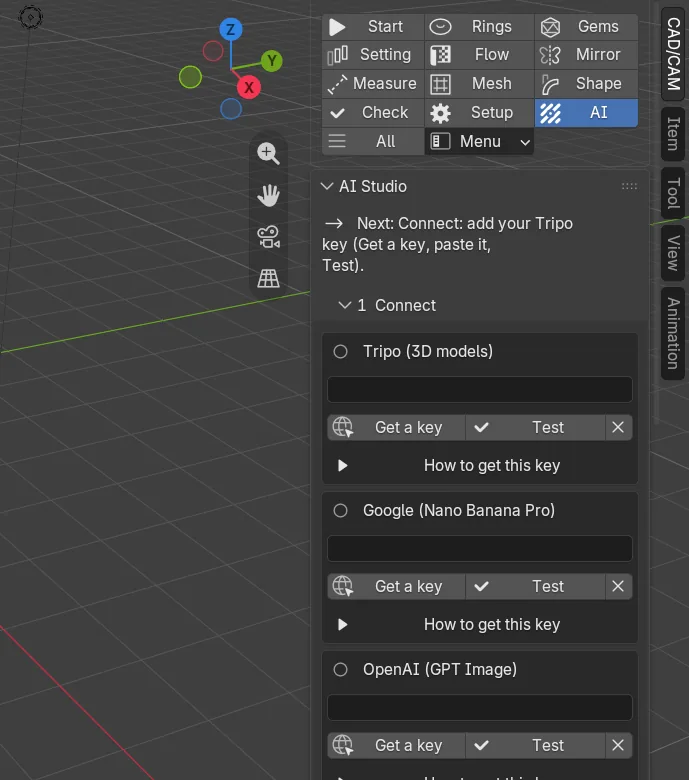
CAD/CAM tab > AI section > AI Studio panel. The 1 Connect panel holds the keys and the 5 Model panel shows the cost. The keys are also in Edit > Preferences > Add-ons > CAD/CAM Jeweller > AI Studio. Menu: Jeweller > AI Studio. There are no keys.
What you need
| You need | Why | What it costs |
|---|---|---|
| Allow Online Access switched on in Blender | Every call to a service goes through it. With it off, nothing is sent. | Nothing |
| A Tripo key | Tripo makes the 3D model. | Credits. 100 credits is about USD 1. |
| A Google key (Nano Banana Pro), an OpenAI key (GPT Image), or your own photographs | The reference picture. | Google lists about USD 0.13 a picture. OpenAI bills by use. Photographs cost nothing. |
| An Anthropic or OpenAI key (optional) | A Claude or ChatGPT model writes the brief from your words. | A few cents at most. The house recipe is free. |
Use it
Step 1. Switch on online access
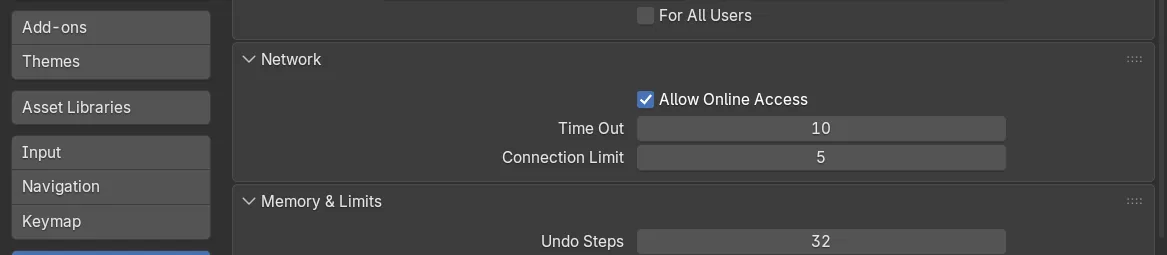
WhereEdit > Preferences > System > Network.
Dotick Allow Online Access.
You should seethe red box “Online access is off in Blender” leave the top of the AI panel. That box has an Open Preferences button if you need it.
Step 2. Make a key
Wherethe 1 Connect panel of AI Studio, in the box for the service.
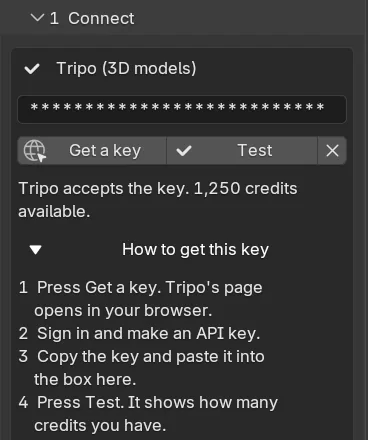
Doclick Get a key. Your browser opens that service’s key page. Sign in, make a key and copy it. How to get this key in the box shows the numbered steps.
You should seethe key page. Nano Banana Pro needs billing switched on for the key’s Google project, and Google lists no free tier for it. GPT Image may ask you to verify your organisation at OpenAI first. The Anthropic key is only for having a Claude model write the brief.
Step 3. Paste it and test it
Wherethe same box.
Dopaste the key into the box and click Test.
You should seeasterisks instead of the key. The mark beside the name is an empty ring (no key), a filled ring (key set), a tick (it works) or a warning sign (refused). For Tripo the sentence also gives your credits. Test is free. The X beside it forgets the key.
Step 4. Read the cost before you click
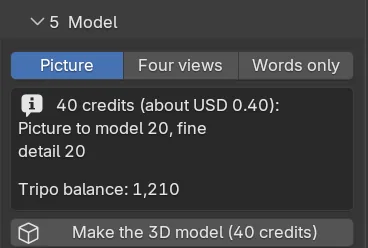
Wherethe 5 Model panel, above the button.
Doread the cost line, then click Make the 3D model.
You should seea line such as “40 credits (about USD 0.40): picture to model 20, fine detail 20”, and the credits on the button. Before it spends, AI Studio reads your balance and refuses with a sentence if there is not enough.
| Step | What it costs |
|---|---|
| Test | Nothing. |
| Refine | House: nothing. Claude or ChatGPT: a few cents at most. |
| Make a picture | Nano Banana Pro: about USD 0.13 a picture. GPT Image: billed by OpenAI by use. Four views make four pictures. |
| Make the 3D model | A picture or four views: 20 credits. Words only: 10. Fine detail adds 20 and is on to start with. Separate parts adds 20. The face limit changes nothing. |
| Fetch the model | Nothing more. |
| Place at true size | Nothing. It runs inside Blender. |
The credits are Tripo’s list prices, so the panel says “about” beside the dollars.
Step 5. Set a daily allowance, only if your own AI app drives Blender
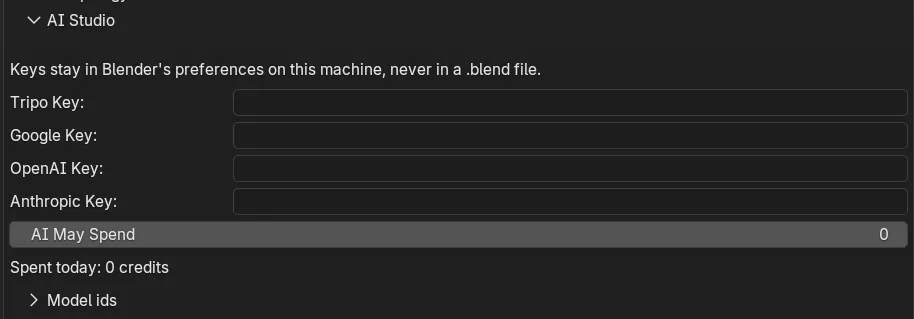
Wherethe Your Own Claude or ChatGPT panel, or Edit > Preferences > Add-ons > CAD/CAM Jeweller > AI Studio.
Doset AI may spend a day, in credits. The preference calls it AI May Spend. Leave it at 0 to be asked every time.
You should see“Spent today” count up as credits are used. The allowance never applies to a button you press yourself: your press is the yes. Drive AI Studio from your own Claude or ChatGPT explains the rest.
Where the keys live
- A key sits in the add-on’s preferences, in a password box. Blender draws asterisks.
- Preferences are saved in Blender’s own user preferences file, on this machine, as plain text. They are never part of a
.blendfile, so sending someone a file never sends a key. - On a shared computer, use an environment variable instead and clear the box:
TRIPO_API_KEY,GEMINI_API_KEY,OPENAI_API_KEYorANTHROPIC_API_KEY. When a box is empty, the add-on reads the variable and the panel says “Key read from” its name. Nothing is written anywhere. - The X forgets a key kept in the preferences. A key in an environment variable is yours to unset outside Blender. If a computer is lost, revoke the key at the service as well.
- The panel says whether a key is set and where it comes from. It never shows the key, or part of it.
What is sent where
- Your words, the brief and your pictures to go by go to the service you chose: Google or OpenAI for the picture, Tripo for the model, and Anthropic or OpenAI if you refine with a model. Nothing goes anywhere else.
- Nothing is sent until you press a button, or your own AI app calls a step and you allow it.
- Calls go only to each service’s own https address:
api.tripo3d.ai,generativelanguage.googleapis.com,api.openai.comandapi.anthropic.com. A finished Tripo model comes from Tripo’s own result hosts. A lookalike address, an address with a name and password in it, any port but 443, a bare IP address and any address that points inside your own network are all refused. - A key goes only to its own service, never in a web address and never with a redirect. A model is downloaded with no key at all.
- Blender is told the add-on needs three permissions: network for the calls above, files for your pictures and the models it saves, and clipboard for Copy the guide for your AI. It never reads the clipboard.
- Check each service’s terms for what you may do with its output.
Settings
| Setting | Default | What it changes |
|---|---|---|
| AI May Spend | 0 credits | Credits an AI app may spend in a day without asking. 0 to 5,000. 100 credits is about USD 1. A picture counts as 15 and a Refine with a model as 1. |
| Model ids | Set by the add-on | Under Model ids in the preferences: the Tripo model, the Google picture model, two GPT Image models, the Claude model and the OpenAI text model. Change one if a service renames it. |
Good to know
- Put on a key only what you are willing to have spent. The real limits are the allowance and the balance on your own accounts.
- Cancel stops the waiting, not Tripo’s task. Tripo may still charge for a task it has taken.
- A generated model is a shape to copy, never a castable file.
| The panel says | What to do |
|---|---|
| Online access is off in Blender | Edit > Preferences > System > Network > Allow Online Access. |
| Tripo did not accept the key | Check the key in 1 Connect and press Test. |
| …not enough credits | Add credits on Tripo’s site. Test shows your balance. |
| Google says this key may not make pictures with this model | Switch billing on for the key’s Google project. |
| OpenAI asks you to verify your organisation | In OpenAI’s settings, open your organisation’s General page. |
| …does not know this picture model | The service renamed it. Change the id under Model ids. |
| …may have been charged | The connection broke after a call that costs credits went out. Check the balance on the service’s own site before you try again. |