

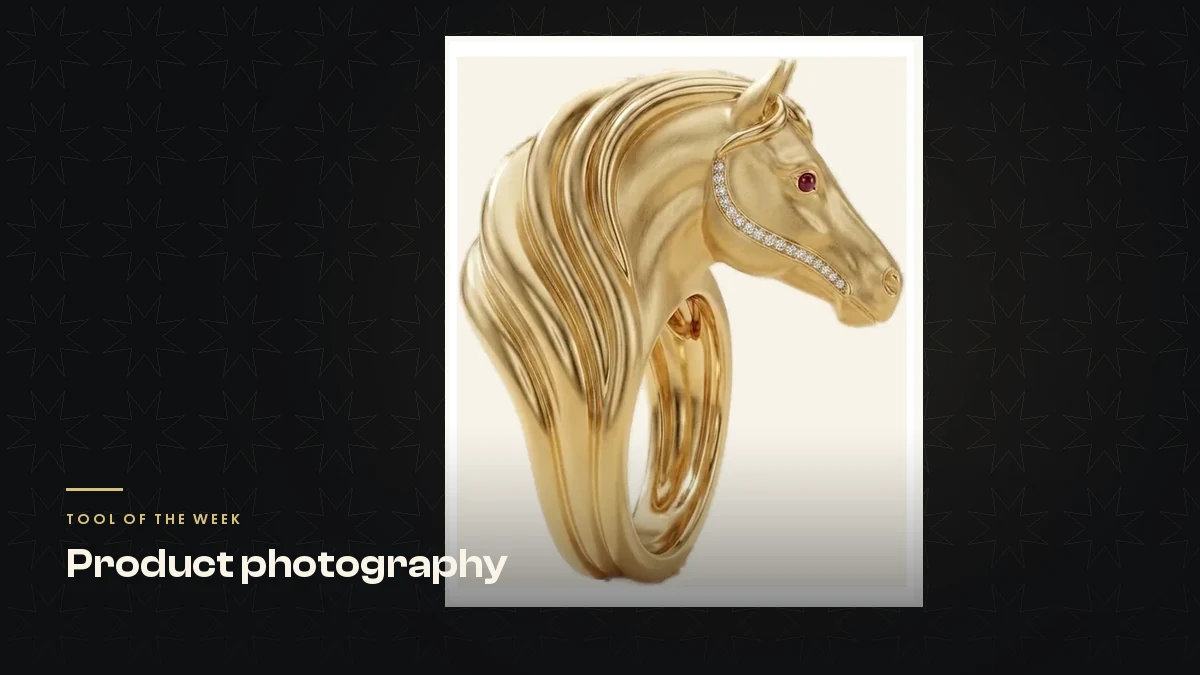
A gold ring shaped like a horse’s head and mane needed its background removed so it could sit on a painted scene on my jewellery brand’s homepage. The ring is called Rakhsh, from my brand Silux London, and the mane is the whole design: it flows back off the ring in one sculpted sweep.
I cut it out with a colour and saturation key, the standard “select the background, delete it” trick. It chewed the flowing mane into a row of separate spikes. Nobody caught it before it went live on the homepage. It was a person looking at the page who spotted it, not any check in the process.
The fix, once I found the right tool, was a single command. This piece is about why the first method failed, what actually works, and a licensing catch that will matter to your business even if the technical side never does.
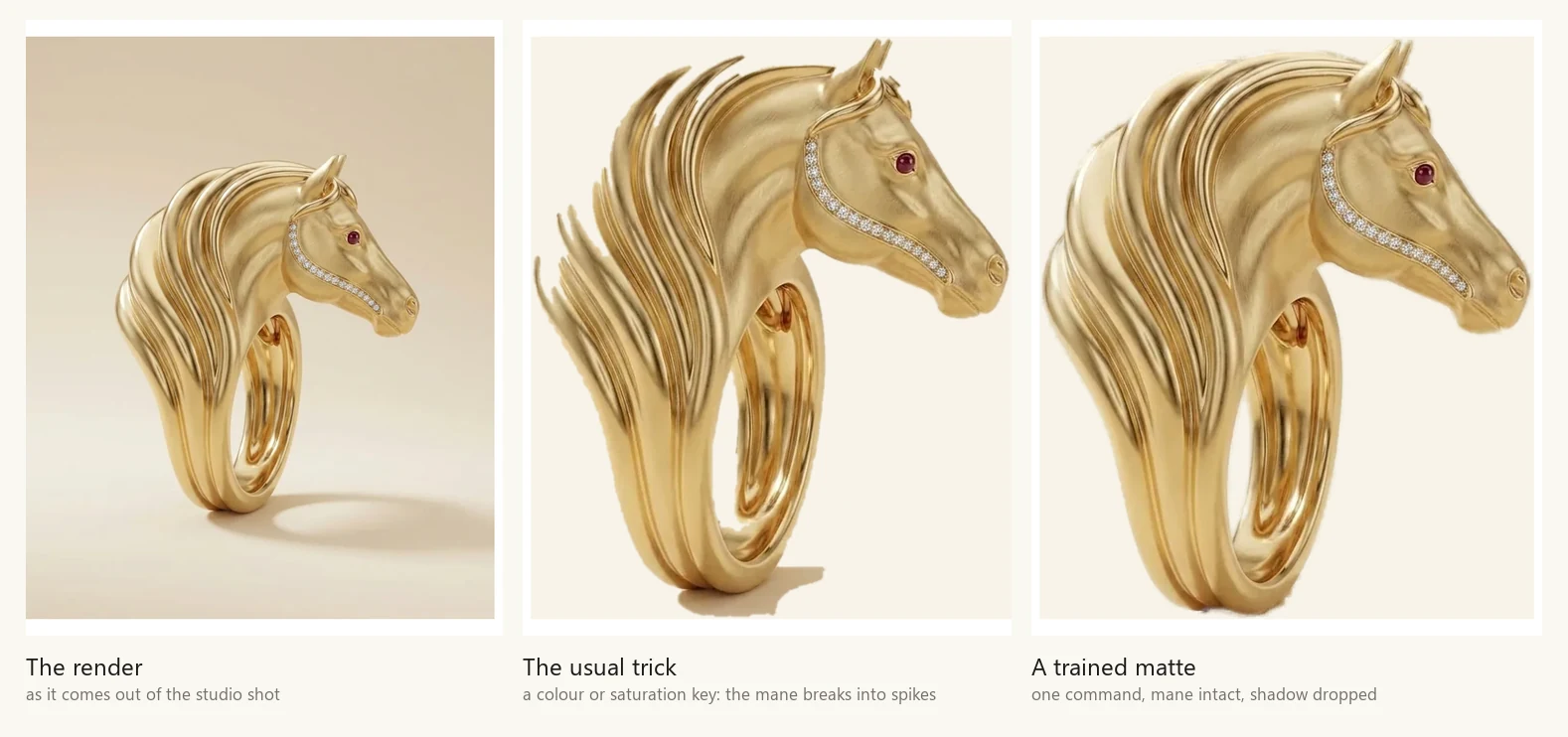
- Colour-based background removers fail on polished metal because gold borrows the colour of whatever sits behind it.
- Check any cut-out on mid-grey or a strong colour, never on white. White hides every fault.
- A trained matte model, not a colour rule, is what actually copes with metal, pave and fine chain.
- The models that cut jewellery cleanest are not clearly free to use commercially. Check what a model was trained on, not just its code licence.
- The cheapest fix sits at the camera: shoot on a background that is not the same tone as your metal.
Why gold breaks background removal
Every simple background remover works on one rule: this colour is the background, that colour is the subject. Magic wand, colour key, saturation threshold: they are all the same idea wearing a different interface.
Polished gold does not really have its own colour. It behaves like a mirror. It borrows the colour and brightness of whatever sits around it, including your backdrop.
Studio jewellery is almost always shot on cream, white or soft grey, because that is what flatters metal. Which means the subject and the background end up close in both warmth and brightness, and a tool built to separate two different colours has nothing to grab onto. It eats the highlights, keeps a slice of the background, or both.
Pave and melee, the small diamonds set into a piece, are the worst case. They are tiny, bright, and surrounded by metal. A threshold-based tool reads them as background and drills small holes straight through the setting.
None of this is a flaw in one particular app. It is what happens when you ask a colour rule to solve a lighting problem.
The four things to check on any jewellery cut-out
Before you trust any cut-out, look for these four faults. They are the same four whatever tool made it.
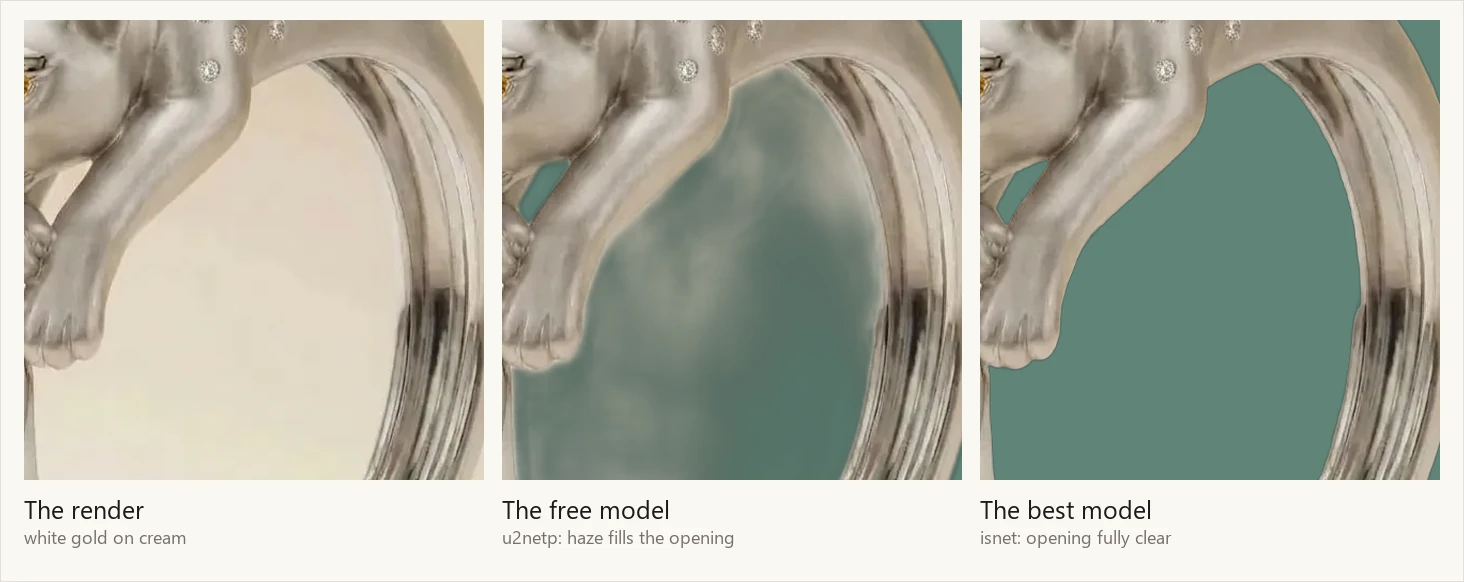
- The aperture. A ring or a bangle has a hole through it, and that hole needs to be fully transparent. A faint milky haze across it looks wrong on any coloured background. The trap is that it looks fine on white, so the fault ships without anyone noticing.
- Thin bright structures. Chains, prongs, wire, the wisps at the edge of a mane. This is where a weak cut-out ghosts, leaving a faded, half-see-through version of the metal.
- The cast shadow. Most tools keep it. You almost never want it: your website or the marketplace listing will add its own shadow, and two shadows read as a mistake.
- Edge colour. Look for a pale fringe of the old background still clinging to the metal’s edge. On a dark page this is very visible.
What actually works
The fix is not a better colour rule. It is a different kind of tool: a trained matte model. Instead of asking which colour is background, it has learned what the edge of an object generally looks like, from a large number of real photographs. It does not care that your metal and your backdrop happen to share a colour, because it was never looking at colour in the first place.
You do not need to be technical to use one. The tool is called rembg. It is open source, it is free, and it runs as a single command.
- Install it:
pip install "rembg[cli]"(the quotes matter on a Mac) - Choose a model and run it:
rembg i -m u2net input.jpg output.png - Open the result over a mid-grey background and check the four faults above before you use it anywhere.
The model you pick in step two is the part nobody explains, and it decides whether your ring’s opening comes out clean or hazy.
Which model actually holds up
I tested five models against four hard cases from my own catalogue: a flowing gold mane, a diamond line set into a plain shank, a fine chain, and a white gold bangle photographed on cream. The results split clearly.
u2netp, a 4.7MB model, and silueta, at 43MB, both filled the bangle’s opening with a milky haze and ghosted the chain into a faded outline. Neither is usable on jewellery.
u2net, at 168MB, keeps the bangle’s opening properly clean, but still ghosts a fine chain.
isnet-general-use, at 171MB, and BiRefNet-lite, at 214MB, gave the best results of the five: crisp chains, clean openings, no haze.
One result surprised me. Several tools offer an “alpha matting” step, meant to refine a mask’s edges. On the weaker models it made the result worse, not better: it pulled a pale cream halo onto the piece, straight off the background it was supposed to remove. Refinement sharpens a mask that is already confident. It does not rescue one that was guessing.

The licensing trap
Here is the part that will matter to your business even if none of the technical detail does. The models that cut jewellery cleanest are not clearly free for you to use commercially.
isnet-general-use and BiRefNet’s standard checkpoints, the two best performers above, are trained on a dataset called DIS5K.
The code repositories for these tools carry Apache-2.0 or MIT badges. Those badges cover the code. They do not clear the trained weights, because the restriction sits in the data the weights were built from, not in the code that runs them. This catches people out constantly, because a green licence badge on a repository page reads like permission.
The paid-or-restricted list is longer than most people realise. BRIA RMBG-1.4 and RMBG-2.0, which power a lot of the one-click browser tools, are released for non-commercial use, with commercial use requiring a paid agreement with BRIA. The @imgly/background-removal package is AGPL-3.0, a strong copyleft licence, or a paid alternative.
The cleanly permissive option is the u2net family: u2net, u2netp and silueta, all Apache-2.0. Those are exactly the ones that struggle on jewellery.
A licence check on a model has to mean checking what it was trained on, not just the badge sitting on the code repository. The free thing that cuts your ring out cleanly may not be free for your business to use. The thing that is definitely free is the one that fills your ring’s opening with haze.
What to do in practice
Start with u2net, the permissive model, and run the four checks above. For a plain ring or pendant against a plain background, it is often good enough.
If it fails on your pieces, you are choosing between paying for a licensed service (remove.bg, BRIA, Photoshop, a retoucher) and using a restricted model on images you keep to yourself. That is a decision for your business, not one a blog post can make for you. I use the better-performing model internally, on my own product photography, and I do not redistribute it. Putting those weights inside a tool other people download, or hosting them for other people’s images, is a different thing entirely, and it is exactly what the restriction is written to stop.
The cheapest fix of all sits at the camera, not the computer. Shoot on a background that is not the same tone as your metal. A mid-grey or a soft colour separates cleanly from gold or silver, and it costs you nothing. Studios default to cream because it flatters the piece, and that is precisely what makes the cut-out hard afterwards. If you are setting up a shoot today, that one choice will save you more trouble than any model you pick later.